760 West Eisenhower Parkway
Suite 200
Ann Arbor, MI
Connecting Diabetes Devices
Please let us know before your appointment if you use a diabetes device (continuous glucose monitor or insulin pump) and follow the instructions below for connecting your continuous glucose monitor to our clinic.
Dexcom
-
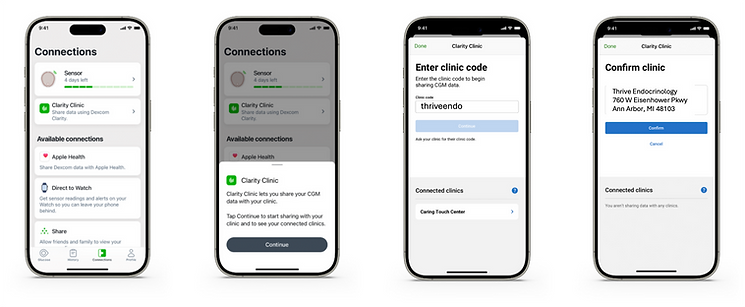
Open the Dexcom sensor app on your smartphone
-
Tap the Connections Tab
-
Tap Clarity Clinic and tap “Continue”
-
Enter the Clarity Clinic Code "thriveendo" when prompted.
-
Confirm clinic details and tap “Done” when finished.
Freestyle Libre
-
Open the Menu: Tap the three lines (≡) icon in the top-left corner of your FreeStyle LibreLink or Libre app.
-
Tap Connected Apps
-
Choose LibreView
-
Tap Connect to a Practice and enter the Practice ID "thriveendo"
-
Once you tap Next and Connect, your practice name should appear under Linked Practices
